Profiles & Authentications
UltimaScraper connects to supported platforms using authenticated user sessions or guest pools. This guide describes how to configure platform authentications, test credentials, manage performer subscriptions, and customize profile metadata.
Configuring Platform Authentications
To add or update account credentials, navigate to Settings → Authentications.
┌──────────────────────────────────────────────────────────────────┐
│ Platform: [ OnlyFans ▼ ]                                         │
│ Account Label: "Main Personal Account"                           │
│ User ID (auth_id): 12345678                                      │
│ Cookie String: auth_id=12345678; sess=abcdef123456...            │
│ User Agent: Mozilla/5.0 (Windows NT 10.0; Win64; x64)...         │
│ Dynamic Token (x-bc): e7f9b8c2...                                │
│                                                                  │
│ [ Test Connection ]   [ Save Authentication ]                    │
└──────────────────────────────────────────────────────────────────┘
Supported Platforms & Required Credentials
| Platform | Required Auth Fields | Extraction Method |
|---|---|---|
| OnlyFans | auth_id, sess (Cookie), user_agent, x-bc token |
Browser DevTools (Network tab -> any api2.onlyfans.com request) or browser cookie export extensions. |
| Fansly | token, user_agent |
Browser DevTools -> Application/Storage -> Local Storage (session_token_v2). |
| LoyalFans | cookie (Session token), user_agent |
Browser DevTools -> Storage -> Cookies. |
Testing Credential Validity
Always click Test Connection after entering credentials. The backend performs an authenticated pre-flight API handshake: - Active & Valid: Displays your account username, display name, and subscription tier. - Expired / Expiring: Emits an alert if session cookies have expired or two-factor authentication has been invalidated.
Guest Session Pools
To protect your primary paid accounts from aggressive platform rate limits during broad catalog discovery, UltimaScraper supports Guest Session Pools:
- Located in Settings → Network → Guest Session Pool.
- Automatically rotates unauthenticated or ephemeral guest cookies when indexing public posts, free performer profiles, or search directories.
- Automatically fails over to paid session credentials only when accessing restricted paywalled content.
Need proxies?
Guest sessions and scrapes can run through proxies, which you add on the Network page. Sign up for Webshare through our affiliate link and you'll get 10 free proxies to see how much they help. It also supports UltimaScraper.
I've personally scraped 500 million public OnlyFans profiles in two to three months with the Mass Profile Scraper (Tools → Mass Profile Scraper) and a Webshare Shared proxy server: 250 proxies, 5,000 GB bandwidth and high concurrency, for around $30.
Managing Performer Profiles & Subscriptions
Navigate to Profiles (or Users) to browse creator channels:
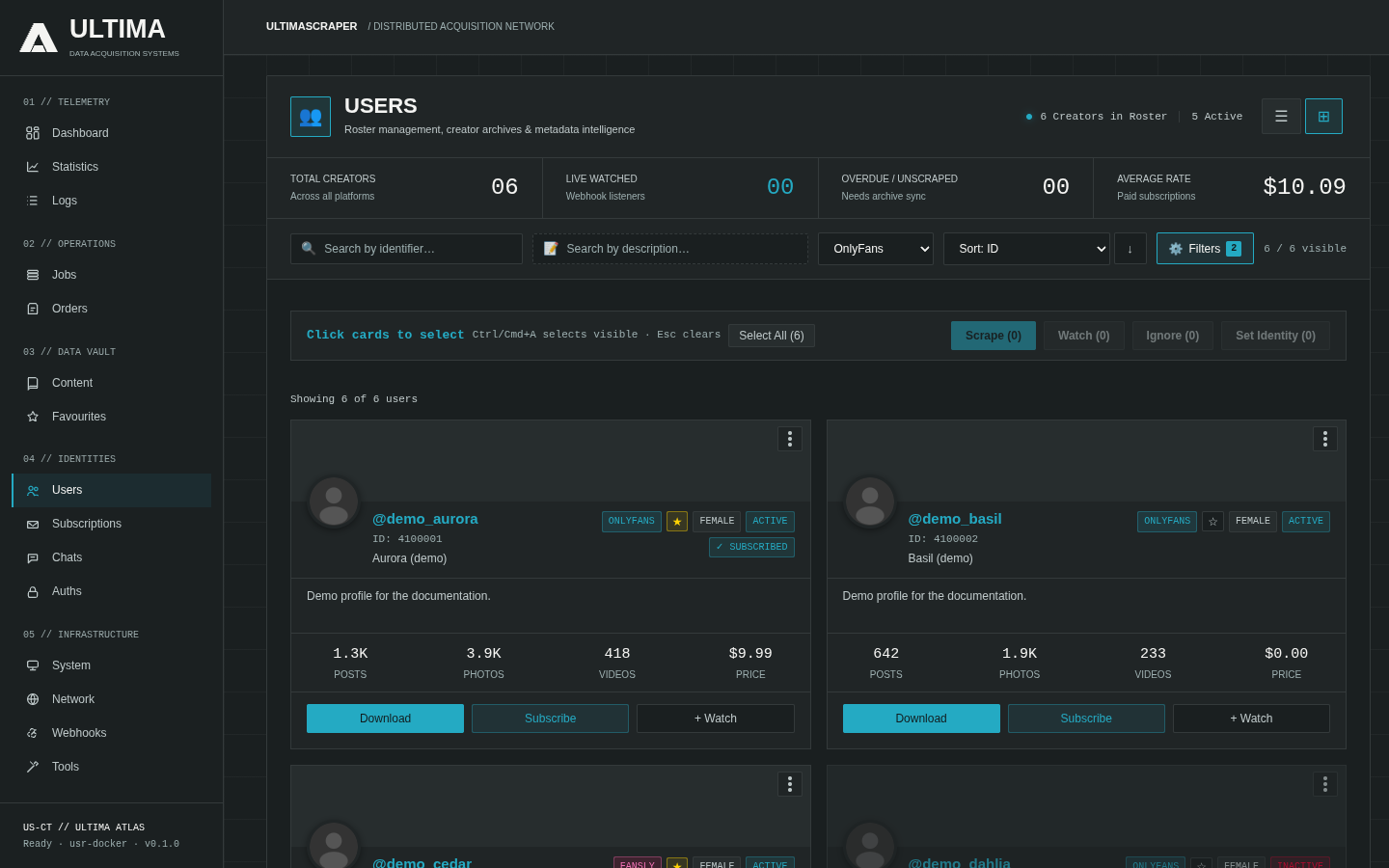
- Subscription Status: Filter by Active, Expired, or Free Following.
- Profile Card Actions:
- Queue Scrape: Directly submits a scraping job for the selected creator.
- Refresh Profile: Fetches updated avatars, banners, bio text, and subscriber counts from the upstream API.
- Set Aliases & Folders: Assign custom folder naming rules and tags to categorize creators across your media storage drives.
- Favourites: Mark performers as favourites for prioritized automated sync jobs.